How to sync Airbnb and Booking.com calendars (and your direct bookings) — 2026 guide
Two ways to keep your Airbnb, Booking.com, and direct booking calendars in sync: the free half-measure that most hosts try first, and the hub setup that actually handles WhatsApp and phone bookings too.
If you list the same property on both Airbnb and Booking.com, you already know the fear: a guest books directly on Booking.com, you don't notice for a few hours, and a second guest books the same night on Airbnb. Now you're picking which reservation to cancel — and either way, someone gets a bad review and you probably owe a relocation fee.
Add in a third booking channel — a friend booking three nights over WhatsApp, a returning guest calling your mobile — and it gets worse. Neither Airbnb nor Booking.com knows about the WhatsApp booking, so both are happy to sell those exact same dates twice more.
There are two ways to solve this. The first is what most hosts try first and rarely finish. The second is what a proper setup looks like — and this guide walks through both.
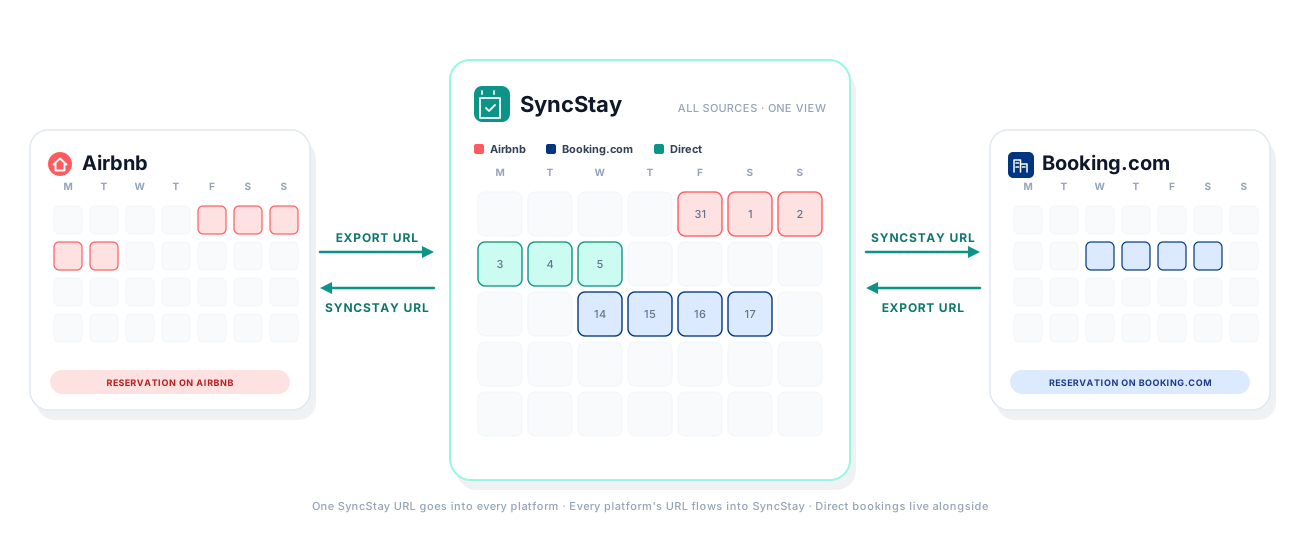
Illustration by SyncStay. Not affiliated with Airbnb or Booking.com.
The two ways to sync your calendars
Option A — direct iCal, two platforms only. You take Airbnb's calendar feed URL and paste it into Booking.com's "Sync a calendar" setting, then do the reverse. Two connections, both free. It works for the pair, and only the pair. If you list on a third platform, you now have six connections to maintain (three pairs, two directions each). Direct bookings via WhatsApp, phone, or Instagram never enter the picture. Nobody is looking at all of them in one view.
Option B — the hub setup. You use a small channel-manager tool — SyncStay is one, and several others exist at various price points — as a single calendar that sits in the middle. Each platform's iCal feed goes into the hub. The hub gives you one iCal URL back out per connected channel, which you paste into that channel's platform. Direct bookings you enter in the hub push out to every channel automatically. Everything lives in one calendar view, so you're never toggling between three admin tabs to check availability.
Option B takes about ten minutes to wire up and is what the rest of this guide walks through. If you also want to see how Option A works on its own — for the pure Airbnb ↔ Booking.com case — the mechanics are covered in the same setup, just applied differently.
What iCal sync actually is
Every modern booking platform exposes a calendar feed in a standard format called iCal (the same format Apple Calendar and Google Calendar use). It's a URL that, when refreshed, returns the list of blocked dates on that calendar — usually a rolling window of the next 12 to 24 months.
Every platform can also import iCal feeds from other sources. Paste an external URL into their "Import calendar" or "Sync a calendar" setting and they'll re-download that feed every few hours, marking those dates unavailable on their side.
Two important limits to know:
- iCal only carries blocked-out dates. Guest name, contact details, and price never travel through it. All the receiving platform learns is "these dates are unavailable" with a generic label.
- The refresh is periodic, not instant. Airbnb polls imported feeds roughly every 2–3 hours; Booking.com's cadence is similar. That means there's always a small window (usually under three hours) where a double-booking is still technically possible. Practically it happens rarely, but it's why nobody who's honest calls this "real-time." A channel manager like SyncStay layers conflict alerts on top so that when it does happen, you find out immediately rather than at guest check-in.
The hub setup, step by step
Step 1: Create the hub and add your property
Sign up for SyncStay (or your channel manager of choice) and add the property you want to sync. SyncStay gives you a 30-day free trial without charging your card during the trial.
Step 2: Connect Airbnb (two-way exchange)
Every channel you connect in SyncStay is a two-way exchange: you paste the platform's own URL into SyncStay so it can read what's booked there, and you paste back a per-channel SyncStay URL so the platform can read everything else.
- In Airbnb, go to Calendar → Availability → Sync calendars and click Export calendar. Copy the
.icsURL Airbnb shows you. - In SyncStay, click Connect a calendar → Airbnb on your property, paste the Airbnb URL, save. SyncStay now generates a per-channel export URL for you — something like:
https://syncstay.co/api/feed/a1c8f2b1c7d4e9.ics
- Copy that URL, go back to Airbnb's Sync calendars page, click Import calendar, name it "SyncStay", and paste the URL.
Airbnb will now poll SyncStay every couple of hours and block any dates that are unavailable in your hub calendar. That includes dates blocked on Booking.com (once you connect it below) and any direct bookings you record in SyncStay.
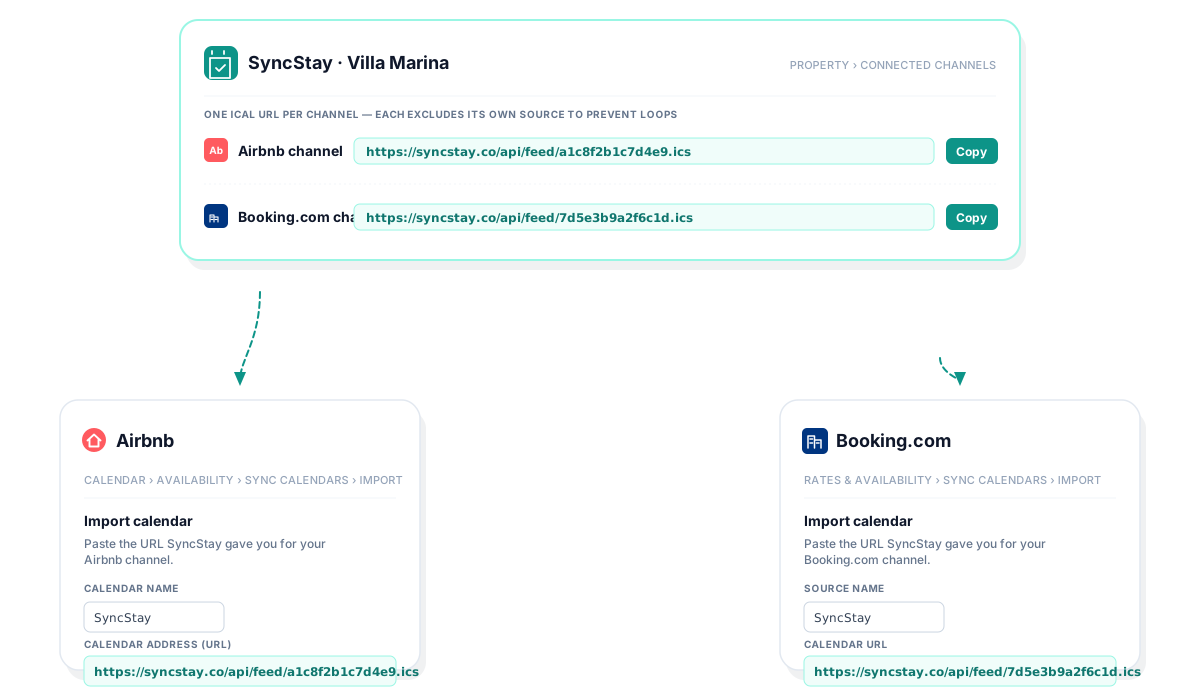
Simplified illustration of the setup flow — not a depiction of the actual Airbnb or Booking.com interfaces. SyncStay is not affiliated with either company.
Step 3: Connect Booking.com (same pattern)
- In the Booking.com extranet, go to Rates & availability → Sync calendars, click Export calendar, copy the URL.
- In SyncStay, click Connect a calendar → Booking.com, paste that URL.
- SyncStay hands you a different URL for the Booking.com channel — something like:
https://syncstay.co/api/feed/7d5e3b9a2f6c1d.ics
- Copy it, return to Booking.com's Sync calendars page, click Import calendar, name it "SyncStay", paste the URL.
Why two different URLs? Each SyncStay URL bundles every booking source for your property except its own. The Airbnb URL never re-publishes Airbnb reservations back to Airbnb, so a booking doesn't feedback-loop as a duplicate block. Same logic in the other direction. It's an invisible piece of the setup, but it's why a hub works reliably at scale.
If you list on a third platform later (an OTA, another niche site), you repeat the same two-way exchange there. One more channel in SyncStay, one more per-channel URL to paste in.
Step 4: Test it with a fake block
The best five-minute sanity check is to block one date manually and watch it propagate.
- Open SyncStay, pick any date at least a week out, and mark it as a manual block (representing a friend visiting, say).
- Wait 30 minutes.
- Check both Airbnb and Booking.com — that date should be unavailable on both.
If nothing shows up after three hours, the URL got pasted wrong. Unsubscribe on the receiving platform and re-paste.
What direct-only iCal (Option A) can't do
Everything above assumes you're routing through a hub. If you skip the hub and just connect Airbnb ↔ Booking.com directly, here's what you give up:
- Direct bookings via WhatsApp, phone, Instagram, or a personal email. Direct iCal has no way to enter these — they exist in your head or your phone's notes app. You'll block those dates manually on both platforms every time, hope you don't forget, and periodically double-book anyway.
- A unified view. Each platform's calendar shows only its own bookings plus imported blocks (with no source label). If you have three properties across two channels, that's six calendar tabs to context-switch between.
- Conflict alerts. If a same-day double booking does slip through the 2–3 hour refresh window, neither platform will tell you. You'll find out when the second guest arrives.
- Guest details. The synced blocks between platforms carry no name, no contact, no price. Fine for blocking purposes; useless for actually running the property.
- Adding a third or fourth channel. Two connections becomes six, becomes twelve. A hub scales as 2N instead of N².
What iCal can't do — yet
Even the hub setup inherits iCal's built-in limits:
- It's not instant. Every step in the chain refreshes every few hours, so worst-case latency between "guest books on Airbnb" and "Booking.com marks the night as blocked" can reach 4–6 hours. In practice it's usually 1–2 hours.
- Guest details still don't cross platforms. Airbnb reservations coming into SyncStay show up as "Airbnb reservation" — Airbnb's iCal doesn't include the guest's name. This is Airbnb's choice, not a limitation of the hub.
- Conflicts can still happen during the refresh window. A hub with real-time conflict detection (which SyncStay includes) can at least alert you the moment it spots one, which is much better than finding out at check-in.
What we're working on. These limits are baked into iCal itself, not something any channel manager can fix on its own. The real fix is a direct integration with each platform's live booking API, which pushes new reservations to the hub within seconds instead of hours and carries the full booking details along with them. We're actively working on adding that path to SyncStay so the same setup you just wired up upgrades from "near real-time" to actually real-time, without you having to change any of your URLs. Current SyncStay customers will move over automatically as it rolls out.
Where SyncStay fits
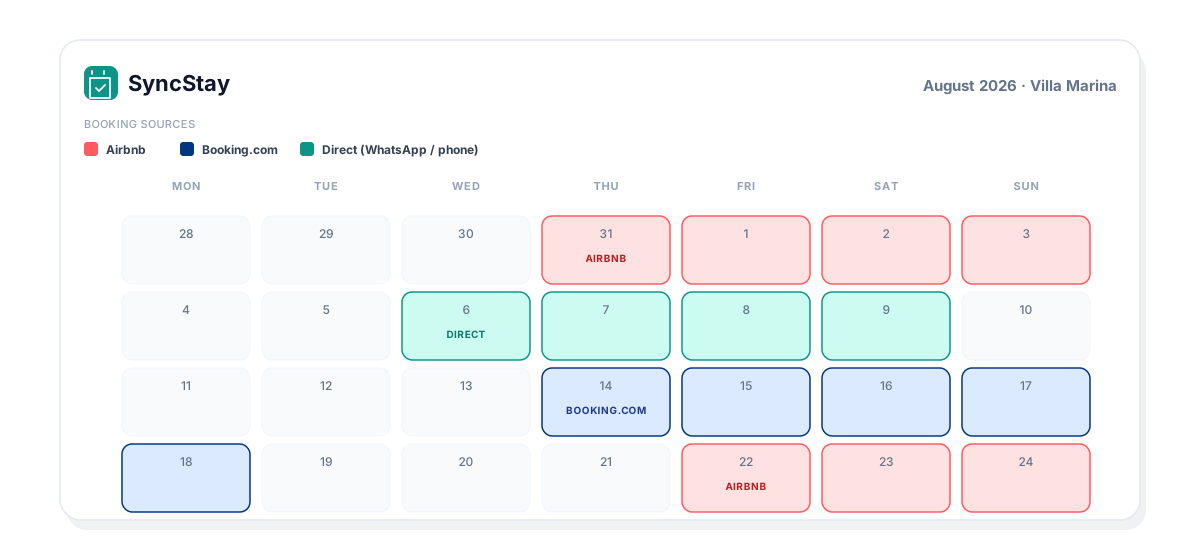
SyncStay is a small channel manager built specifically for hosts with one to ten properties. The whole product exists to solve the problem this article describes:
- One per-channel iCal URL goes into each platform you list on — Airbnb-side to Airbnb, Booking-side to Booking. Each feed excludes its own source so nothing loops back as a phantom block.
- Direct bookings entered in SyncStay are published as blocks to every connected platform. Someone books via WhatsApp; Airbnb and Booking.com learn about it automatically.
- Colour-coded unified calendar — Airbnb, Booking.com, and direct bookings side by side, per property or across your whole portfolio.
- Conflict alerts by push and email the moment we spot two real reservations overlapping — including during the small iCal-refresh window that direct iCal doesn't cover.
Every plan starts with a 30-day free trial. You add a card to start it (standard for channel managers — it's how we keep the trial pool honest), nothing is charged until day 31, and you can cancel any time from settings — you keep access until the end of your period.
If the setup above sounds like your daily headache, we built this for exactly your kind of host.