How to sync your Airbnb calendar with Google Calendar (and what it won't do)
It takes four minutes and it's free. But a subscribed calendar is a mirror, not a lock — here's exactly how to set it up, and precisely where it stops protecting you.
Wanting your Airbnb bookings to show up in Google Calendar is a reasonable thing to want. You already live in that calendar. Your dentist appointment is in there. Why should your bookings sit somewhere else entirely, behind a login you check twice a day?
Good news: it takes about four minutes, it's free, and Airbnb supports it directly.
Less good news: what you end up with is weaker than most people expect, in a way that isn't obvious until it costs you something. So this guide does both halves — how to set it up, and exactly where it stops.
Step 1 — Get your Airbnb calendar link
In Airbnb, open your listing's calendar and look in its availability settings for the calendar-syncing options. Airbnb moves this around from time to time, so go by what you're looking for rather than the exact menu name: a section about connecting or syncing calendars, containing an option to export yours. Choose it and Airbnb generates a long link ending in .ics — copy that.
That link is a live, read-only feed of your booked and blocked dates. Anyone holding it can see when your place is occupied, so treat it like a password: don't paste it anywhere public.
Step 2 — Add it to Google Calendar
You'll need a desktop browser — this can't be done from the mobile app.
- Open Google Calendar
- In the left sidebar, find Other calendars and click the +
- Choose From URL
- Paste the link and click Add calendar
Your bookings appear within a few minutes. That's the whole job.
What you just built
It's worth being precise here, because the word "sync" is doing a lot of heavy lifting.
It only goes one way. Airbnb tells Google what's booked. Google tells Airbnb nothing, ever. Block a week in Google Calendar for a family visit and Airbnb has no idea — it will take a booking straight through it.
It's read-only. You can't edit, cancel or add a booking from Google Calendar. It's a window, not a control panel.
It's slower than you'd think. Google doesn't fetch that link when you open the app, or on demand. It refreshes subscribed calendars on its own schedule — in practice hours, not minutes — and there's no button to force it. A booking that lands this morning might not appear until tonight.
For "I'd like to glance at my phone and see when guests arrive", that's fine. It does that job well, and it's better than opening the Airbnb app.
Where it breaks
Now add a second platform.
Say you list on Airbnb and Booking.com. You subscribe to both calendars in Google Calendar. Now everything's in one place, which feels like the problem is solved.
It isn't. Watch what happens on a night both platforms sell.
A guest books 14–18 March on Airbnb. Twenty minutes later, another guest books 16–20 March on Booking.com. Neither platform knows about the other, because Google Calendar isn't telling them anything — it's just drawing both.
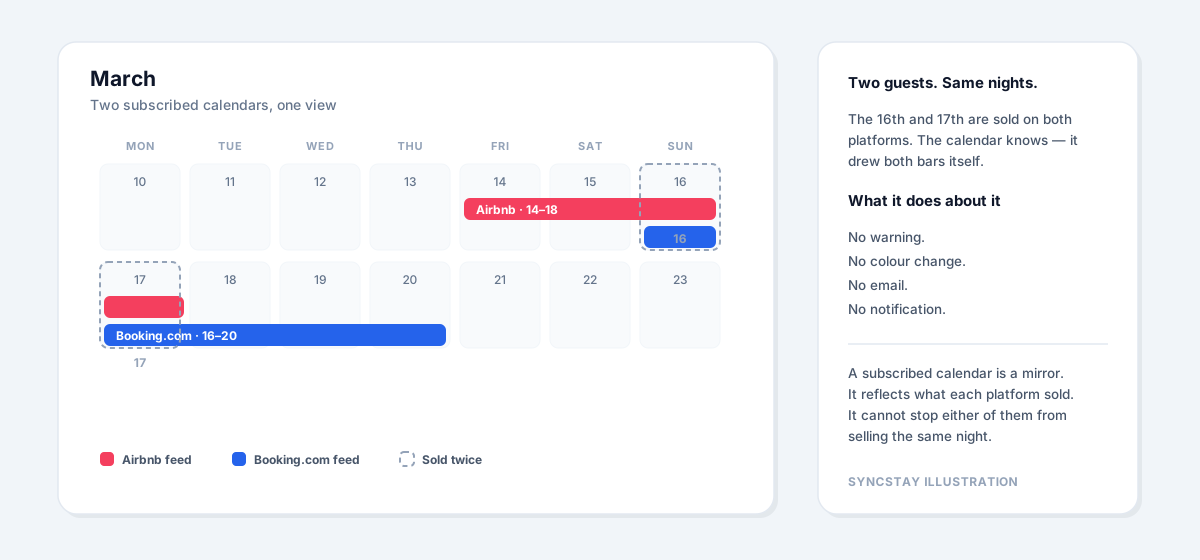
A SyncStay illustration, not a depiction of any platform's interface.
You have a double booking. It is sitting on your screen, drawn neatly, and the calendar considers its job done.
Whether you catch it depends entirely on whether you happen to look, and whether you notice two bars overlapping in a month with thirty other things in it. Most hosts find out at check-in, when two people are at the door.
That's the ceiling. Viewing your calendars in one place is not the same as connecting them.
What actually prevents it
Two things have to be true, and a read-only feed can't provide either.
Every platform has to know what the others sold. Not you — the platforms. When Airbnb takes a booking, Booking.com's calendar needs to close those nights automatically, without you touching anything.
Something has to be watching. Platforms update their calendars on their own schedules. In the gap between one selling a night and another finding out, both can sell it. Someone has to be checking for that overlap and telling you the moment it appears — not whenever you next open an app.
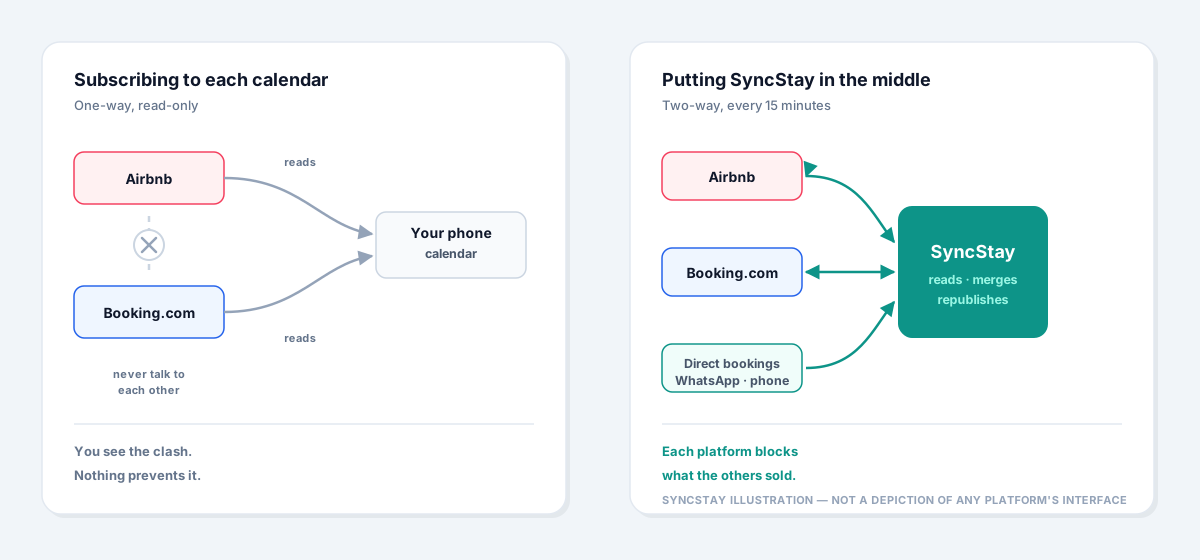
A SyncStay illustration, not a depiction of any platform's interface.
That's what SyncStay does. It sits in the middle: reads every platform's calendar, republishes a combined feed that each one subscribes to, and re-checks all of them every 15 minutes. When two real bookings claim the same night, you get an email while it's still a phone call and an apology — instead of a stranger at the door.
We're honest about the limits of that too. We read those calendars on a schedule rather than being handed updates as they happen, and when we publish our own feed it's each platform's decision how often to read it. What we control is the noticing, and we've made that part fast.
And if you liked the Google Calendar view, you keep it. SyncStay gives you a single link with everything on it — every platform, plus the direct bookings you took over WhatsApp. Add that one calendar instead of two separate feeds and your phone shows the whole picture.
The short version
Syncing Airbnb to Google Calendar is genuinely useful and takes four minutes. Do it. It's a better window into your bookings than the app.
Just know what it is. It's a mirror, not a lock — and it will show you a double booking with exactly the same calm it shows you everything else.
If you're juggling more than one platform, that gap is the thing SyncStay was built to close. Every plan starts with a 30-day free trial — card required to start, nothing charged until day 31.